---
title: AI Text Parsing Setup Guide
description: Learn how to install and use AI Text Parsing for HubSpot to extract text from uploaded files and store it in multi-line text properties using workflows.
---
[Skip to content](https://www.growth-operations.com/help-articles/ai-text-parsing-setup-guide#main-content)
[](https://www.growth-operations.com/)
Open main navigation
Close main navigation
- [Submit Help Request](https://www.growth-operations.com/submit-help-request)
[Submit Help Request](https://www.growth-operations.com/submit-help-request)
How can we help you?
- There are no suggestions because the search field is empty.
1. [Help Articles](https://www.growth-operations.com/help-articles)
2. [Setup Guides](https://www.growth-operations.com/help-articles/setup-guides)
3. [AI Text Parsing](https://www.growth-operations.com/help-articles/setup-guides#ai-text-parsing)
# AI Text Parsing Setup Guide
### **Overview**
Extract the text from an uploaded form file property into a multi-line text property using a workflow action
### **Prerequisites**
Before proceeding, make sure you have signed up for a Growth Operations account [here](https://www.google.com/url?q=https://app.growth-operations.com&sa=D&source=editors&ust=1787324197341419&usg=AOvVaw1RU93SFxdcNJ_EgnJfIAb7).
### **Installation**
You can install the app by visiting [app.growth-operations.com](https://www.google.com/url?q=https://app.growth-operations.com&sa=D&source=editors&ust=1787324197342014&usg=AOvVaw1TXiwt8ia0A6IjtUxvvJpL), selecting the integrations tab, clicking “Add a new integration”, and then the install button:

Installing the app will automatically sign you up for a 14-day trial of the standard plan, which includes all features of the app. Next step is authorizing HubSpot.
### **Authorization**
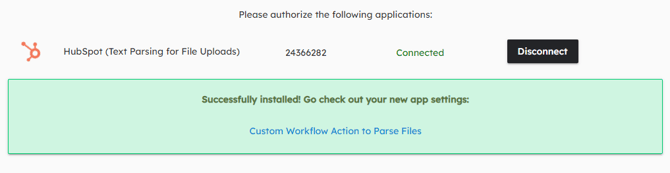
On the authorization screen, click the “Connect” button to authorize HubSpot.

This will take you to hubspot.com to select your desired portal to connect to and to approve the necessary permissions.
Once you are connected, the installation is complete! You’ll be automatically signed up for a 14-day free trial.
### **Usage**
You can now add a custom workflow action to parse a file property on any object and extract the text to a multi-line text property.
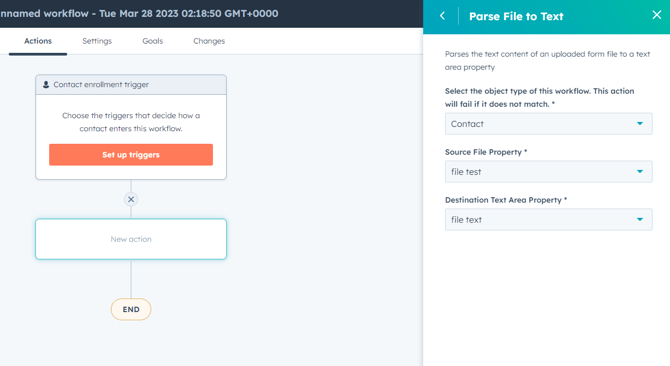
This allows you to to use the full power of HubSpot to search through uploaded documents in your forms!
Currently supported file types include:
- PDF
- JPG
- JPEG
- PNG
- DOCX
- DOC
- TXT
- XLSX
### **Uninstallation**
In order to uninstall the Text Parsing app, follow the steps provided in [this article](https://www.google.com/url?q=https://knowledge.hubspot.com/integrations/connect-apps-to-hubspot%23uninstall-an-app&sa=D&source=editors&ust=1787324197344864&usg=AOvVaw1Js7pEUWR3rZrKuBar_UVd) regarding uninstalling connected apps.
Note: Uninstalling the app will not delete any of your existing data, however, it will impact your ability to use the functionality described above.
### **Cancellation**
If you wish to cancel your subscription, you’ll first need to log-in to your profile within [app.growth-operations.com](https://www.google.com/url?q=https://app.growth-operations.com&sa=D&source=editors&ust=1787324197345804&usg=AOvVaw0IVBQnrLAcvEjnI84zHRfQ)
Then, go to integrations on the left-hand menu, to find your list of apps.
Go to Text Parsing and hit the actions drop-down.
At the top, select Manage Subscription.

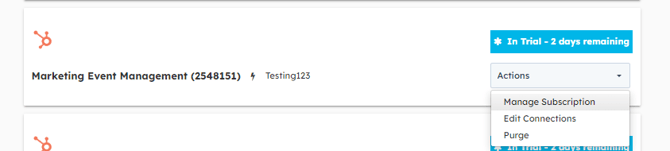
This will bring you to where you can cancel your subscription.

### **Support**
For any additional inquiries or feature requests, please submit your feedback to info@growthoperationsco.com
[](https://www.growth-operations.com/)
[mailto:email@email.com](mailto:email@email.com)
Copyright © 2026, Growth Operations LLC